
Shopping list
One shared list for the whole household – all members see the same items.
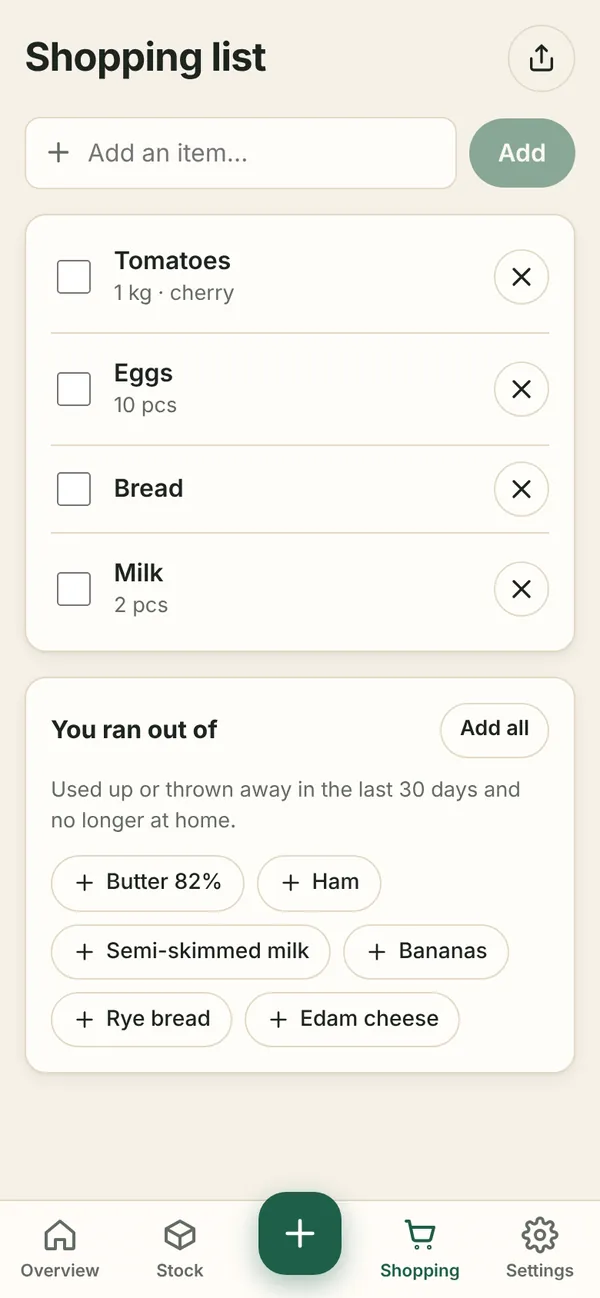
Adding
- Type an item and press Add. You can include the amount:
Milk 2,1.5 kg flour,Eggs 10. - The same item is not added twice – amounts are added up.
- Tap an item to change its name, amount or note (e.g. lactose-free).
You ran out of
You ran out of suggests things you used up or threw away in the last 30 days that are no longer at home. Tap a suggestion, or Add all.
You can also send an item to the list while using it up – with To list in the confirmation or by ticking Add to shopping list.
In the shop
Tick off what you buy – it moves to In the cart. Send the list to someone with Share list (icon top right).
After shopping
- Add bought items to stock – opens the bulk editor with the bought items. Place and shelf life are prefilled from how you stored the same thing last time. After saving, the items disappear from the list.
- Clear bought – just clears the list without adding to stock (for example when you imported the whole shop from the receipt).