
Using up & throwing away
When you eat or throw something away, mark it – it leaves your stock, reminders stop and the item shows up in the shopping list suggestions.
Quickly from the list
On the item card tap ✓ (Mark as used up). With a single piece that is all.
A confirmation appears at the bottom with:
- Undo – a mistake? The item comes back exactly as it was.
- To list – adds it to the shopping list.
When you have several pieces
If you have, say, 2 yoghurts or 1 kg of flour, the app asks How much?
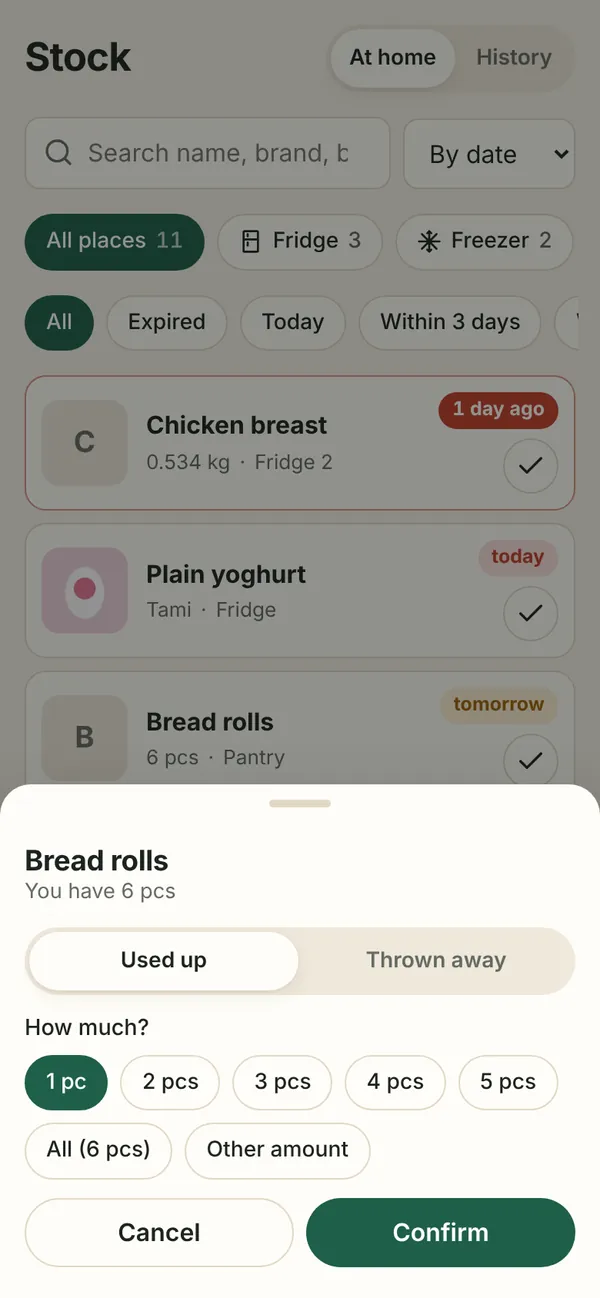
- Choose Used up or Thrown away.
- Pick the amount (1 pc, All, or Other amount).
- With All you can tick Add to shopping list straight away.
- Confirm.
The rest stays in stock with the original date and reminders.
In the item detail
The detail has Used up, Thrown away and Just opened buttons. Telling used up and thrown away apart pays off – the history shows what goes off most often in your home.
History and undo
Stock → History lists everything used up and thrown away. Open an item and choose Return to stock if you marked it by mistake.