
Import a receipt
Every Slovak till receipt has an eKasa QR code. Spotrebio downloads the items from the Financial Administration of the Slovak Republic, suggests a place and expiry date, and you save the whole shop with one tap.
How to
- + → Scan a receipt (or Receipt in the left navigation on larger screens).
- Scan the QR code. If the receipt is crumpled, try From photo, or type the receipt ID starting with
O-. - The items from the receipt appear. Non-food (bags, bottle deposits…) is skipped and duplicate lines are merged.
- Check the names, place and expiry date. Dates are only an estimate based on the type of food – the package is more precise.
- Save N – all items are saved at once and each gets its own reminders.
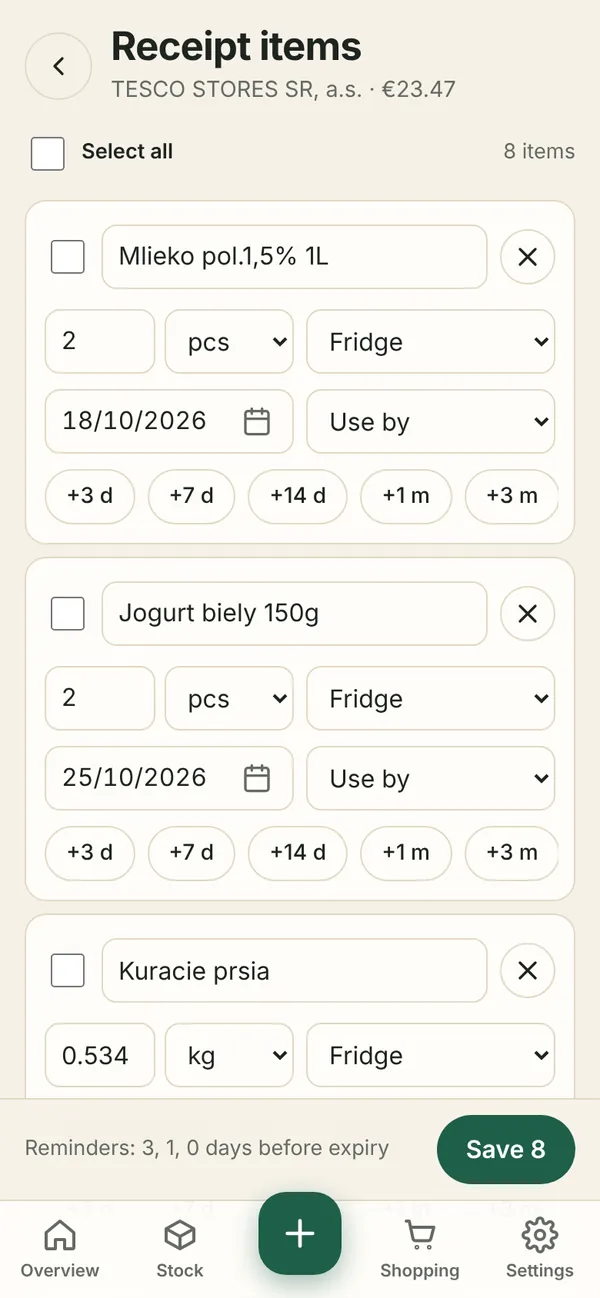
Bulk editing
- Tick rows (or Select all), choose a date, place or date type and press Apply to selected.
- Remove rows you do not need and add missing ones with Add row.
- On a computer the editor is shown as a table.
If you have already saved the same receipt, the app warns you so you do not add the items twice.
Without a receipt
+ → Bulk add opens the same editor with an empty list – handy for a market shop or filling the pantry for the first time. Items ticked off on the shopping list are added to stock through this editor too.
When a receipt will not load
- New receipts sometimes appear in eKasa only after a few minutes – try again shortly.
- For offline receipts (the code does not start with
O-) the Financial Administration may return the data later or not at all. - Receipts from abroad and e-shop invoices cannot be loaded – use Bulk add.